
How to Turn Your Website into an “Answer Source” for AI in 7 Practical Moves
Your site is talking. AI just can’t understand it yet.
Most websites already contain the answers buyers and users are looking for.
The problem is not content quality.
It's interpretation.
AI systems like Google Search Generative Experience, ChatGPT, and Perplexity do not read your website the way humans do. They look for clear questions, short answers, and unambiguous identity signals. When those are missing, even strong content gets ignored.
This guide walks through seven practical changes you can make to help AI systems understand, trust, and surface your site as an answer source.
Step 1: Pick one primary question per page
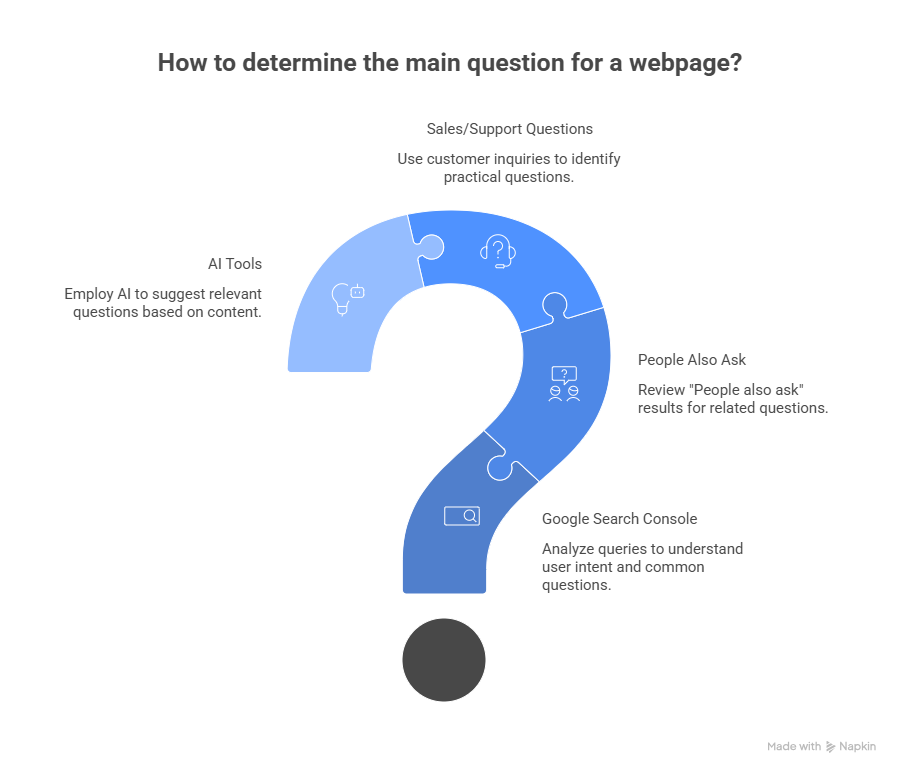
Every page should answer one main question.
Not a theme. Not a keyword cluster. A single, explicit question.
How to find the right question
Use:
- Google Search Console queries for that page
- “People also ask” results
- Sales, demo, or support questions
- AI tools like ChatGPT or Perplexity by asking:
“What question would this page most likely answer?”
Examples
- Homepage: What does this company actually do?
- Pricing page: How much does this product cost and what’s included?
- Feature page: How does this feature work?
- Comparison page: Product A vs Product B. Which is better for a specific use case?
Once the question is clear, everything on the page should support answering it.
Step 2: Rewrite H2 and H3 headings as questions
AI understands questions better than descriptive headings.
So do humans.
Before and after example
Old heading
AEO-optimized heading
Platform overview
What does the platform do?
Key benefits
What problems does it solve?
Integrations
How does it integrate with other tools?
If a heading sounds like a brochure section, rewrite it.
If it cannot be answered in one short paragraph, make it more specific.
Step 3: Add 40 to 60 word answer blocks under each question
Directly below every question-style heading, add a short answer block.
This is the most important AEO change you can make.
Example
What does the platform do?
The platform helps B2B teams automate lead qualification, email outreach, and follow-ups in one workflow. It connects CRM data with inbox behavior and intent signals, reducing manual work while improving reply rates without increasing email volume.
Guidelines:
- 40 to 60 words
- Clear and neutral language
- No links inside the answer block
- Expand below it if needed, but keep the first answer clean
These blocks are often extracted directly by AI systems.
Step 4: Add a FAQ section to every core page
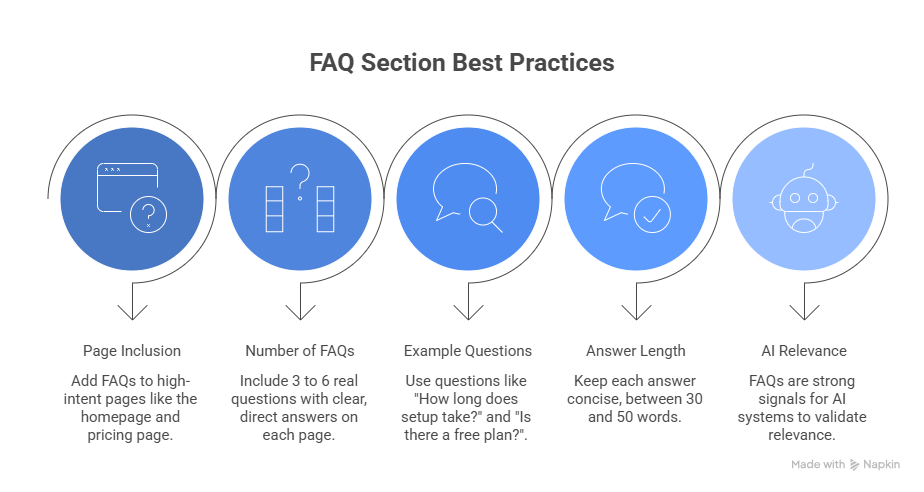
Every high-intent page should end with a FAQ section.
This includes:
- Homepage
- Pricing page
- Core feature pages
- Comparison pages
- Important landing pages
How many FAQs?
- 3 to 6 per page
- Only real questions people ask
- Clear, direct answers
Example FAQ questions
- How long does setup take?
- Who is this product best for?
- Does it work with Gmail and Outlook?
- Is there a free plan or trial?
Each answer should be around 30 to 50 words.
FAQs are one of the strongest signals AI systems use to validate relevance.
Step 5: Add schema using simple, accurate markup
Schema helps AI systems confirm what your page is about. It does not replace content. It reinforces it.
You do not need a complex or heavy schema. In most cases, three types are enough.
Use these schema types
- Article for blogs and long-form content
- FAQPage for FAQ sections
- HowTo only when the page genuinely explains steps
How to apply FAQPage schema correctly
- Only mark up questions that are visible on the page
- Each question must have one clear answer
- The schema must match the on-page text exactly
- Add it once per page
Common mistakes to avoid
- Adding schema without visible FAQs
- Keyword-stuffing answers
- Reusing the same FAQ schema across multiple pages
- Auto-generating schema without reviewing content
Schema does not guarantee visibility.
It improves extraction accuracy when AI decides what to trust and quote.
Step 6: Create an identity block so AI knows who you are
AI systems need a clear identity anchor.
Add Organization and Website information to your homepage and About page so AI can confidently attribute answers to your brand.
Your identity block should clearly state
- Legal company name
- Website URL
- Logo
- Short description of what you do
- Consistent external references like LinkedIn or GitHub
If AI cannot confidently identify who you are, it is less likely to surface your content.
Step 7: Test with real AI systems and refine
AEO is iterative.
What to test
- Google Search Console impressions and queries
- ChatGPT: “What does [your brand] do?”
- Perplexity: category-level queries in your space
- Google SGE previews where available
What to tweak
- Rewrite unclear answer blocks
- Simplify or sharpen headings
- Remove overlapping or repetitive FAQs
- Tighten identity descriptions
Small refinements can have a noticeable impact.
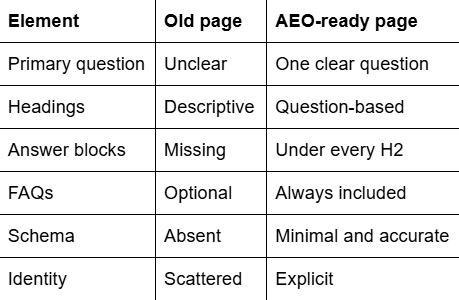
Before and after: Page structure snapshot
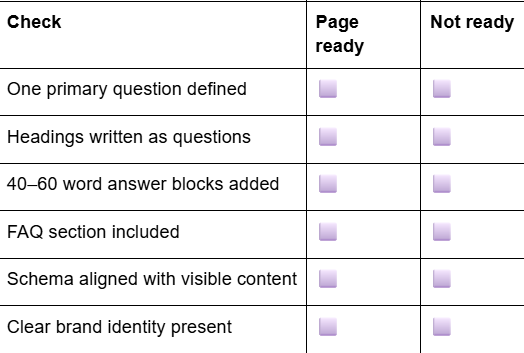
Final checklist before publishing


.png)
.png)
.png)
.png)
.png)
.png)
.png)
.png)
.png)
.png)
.png)
.png)

.png)
.png)
.png)
.png)


.png)
.png)

.png)


.jpg)

.jpg)
.jpg)


.png)


.png)

.png)
.png)
.png)


.png)
%20(2).png)
.png)
.png)




.png)

.png)


.png)


.png)


.png)


%20BLOG%20BANNER.png)


.png)